Category Archives: Technology

Guy Kawasaki and Steve Balmer

This is a fun interview. Guy Kawasaki interviewing Steve Balmer at Mix 2008. These are two extremely smart people with a lot to talk about. It might not have any new news — Steve has to be very careful what he says, the SEC has a lot of rules and it’s really easy to get sued in his position — but Guy doesn’t pull any punches and Steve is up to it.

I’m amused by the fact that to see this video I had to download Microsoft’s new Silverlight on my Mac. And it worked perfectly.

Watch Steve Ballmer and Guy Kawasaki Keynote | News | MIX Online

Watch Steve Ballmer and Guy Kawasaki Keynote

Is That Solar Coming? Or Was it Hot Already?

The right solar panels spread over a 10 mile by 10 mile square of Eastern Oregon desert could provide enough power to run the United States. Or so I was told last week by Scott Pope, of Sustainable Wealth, who makes a living investing other people’s money in stocks and chooses those stocks based on qualities like sustainability, social conscience, governance, and environmental impact.

Meanwhile yesterday’s Sunday New York Times has a piece called Silicon Valley Starts to Turn Its Face to the Sun about a rush to invest in solar technologies.

Given the valley’s tremendous success in recent years with such down-to-earth products as search engines and music players, tackling solar power might seem improbable. Yet some of the valley’s best brains are captivated by the challenge, and they hope to put the development of solar technologies onto a faster track.

There is, after all, a precedent for how the valley tries to approach such tasks, and it’s embodied in Moore’s Law, the maxim made famous by the Intel co-founder Gordon Moore. Moore’s Law refers to rapid improvements in computer chips — which would be accompanied by declining prices.

A link between Moore’s Law and solar technology reflects the engineering reality that computer chips and solar cells have a lot in common.

“A solar cell is just a big specialized chip, so everything we’ve learned about making chips applies,” says Paul Saffo, an associate engineering professor at Stanford and a longtime observer of Silicon Valley.

I’m certainly no expert, but I wonder if the NYT doesn’t have cause and effect slightly off on this one. I’ve heard — I think Scott mentioned that during our talk last week — that venture capital investment has been driving progress in solar energy for 5-10 years already.

And then there’s the near rant on climateprogress.org, suggesting, not altogether politely, that it doesn’t take the New York Times notice to make Solar hot:

NOTE to NYT: Solar has gained traction already. And further growth won’t be driven by “will,” it will be driven by, uhh, the growing consensus on the need to price carbon dioxide emissions to fight global warming and, uhh, record high energy prices that will no doubt be even higher in a decade, coupled with technology improvements and mass production techniques, some (but probably not most) of which will come from Silicon Valley. But I guess the real story is not sexy enough for the Gray Lady.

Does it matter who was there first? I think what does matter is lots of people having the same kind of idea at the same time, and that, finally, people are starting to see newer cleaner energy as a money-making opportunity.

Do You Agree With This List of Worthwhile Technologies?

Gene Marks offers his list of worthwhile small business technologies in BusinessWeek‘s latest. As a reminder, he had a list of useless technologies and/or overrated small business technologies not that long ago, so this is a nice companion piece. Here are his 10:

  1. Remote Desktop Technology. That’s built into Windows these days — depending on your firewall. I also use gotomypc.com during some of my travels. My needs in this area were solved last year by taking on the Zimbra mail server, which gives me the same email view and calendar from any computer with a network connection.
  2. Desktop sharing software. As in WebEx, GoToMeeting, Microsoft Windows Meeting Space, etc.
  3. Free conference calling. Gene mentions freeconferencecall.com. I have no experience to add to this, but with phone calls getting cheaper all the time … and then there’s Skype, which I use off and on.
  4. Wireless connectivity. Gene is funny on this one: "I’m pretty sure there’s a tumor growing somewhere in my brain. And I’m expecting my grandchildren will be born with three heads. But who cares! The wireless world is here and I’m loving it! Those invisible cancerous waves floating around our atmosphere let me watch a training video while sipping a mocha at the local coffee shop. I can check e-mail and look up a customer’s order history while on the train. I’m quickly getting online at hotels, bookstores, and libraries."
  5. Email marketing services. Really? Looks and feels like spam to me.
  6. Contact Management Software. Gene likes Outlook Business Contact Manager, built into Office 2007. "Small businesses (and many large ones) don’t need all the complexity of a CRM system. We just need a simple place to keep all of our business contacts, along with some notes, so that we can track who spoke to them last and what’s scheduled next."
  7. Hosted phone services. Works well for very small offices, loners, individual practitioners. Gene mentions VirtualPBX and GotVmail.
  8. Messaging software. As in instant messaging. We have 40 people in our office, and we use Yahoo Messenger, and it works.
  9. SQL Server. Gene likes the Microsoft SQL server, particularly SQL Server Express, which is free. I know a lot of people who prefer the open source MySQL because it’s free and it’s been there longer.
  10. Google Applications. Yes, I use them too. Everybody I know uses them. Gene says: "And did I mention it’s free? Hang on. Maybe this Web 2.0 stuff isn’t so bad after all."

Tim Draper: Big Changes in the VC Model

Tim Draper is one of the most influential and best known venture capitalists in the world, founding partner of Draper Fisher Jurvetson, and he’s looking at a brave new world of new media, content, and new opportunities. This is from vator.tv late last week.

http://vator.tv/embed/player.swf?videoSrc=http://s3.amazonaws.com/vator_production_out/1871_Tim-Draper-edited-and-compressed.flv&fillColor=0xFFFFFF&videoMode=embed&pitchURL=http://vator.tv/news/show/tim-draper-talks-about-a-new-vc-model-for-new-media-investing

He’s saying that the new Web 2.0 landscape will change the way venture capital does business. Despite a lot of background noise — and it’s only 2-some minutes long — it’s a very interesting snippet.

Kindling on the Beach

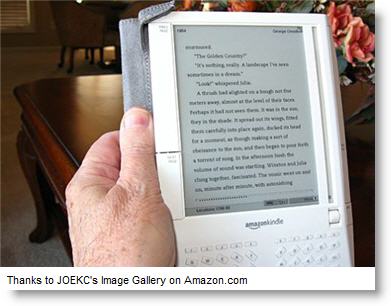
So my Kindle traveled with me this time, for the first time ever. This was a business trip to Miami, two flights out, two flights back. And yes, there were some off moments, which you can see in the picture. That’s not a stock picture, that’s my Kindle, in my hands, and those are my feet. So I wasn’t working all the time.

The Kindle is the new Amazon ebook reader, released in early December.

The convenience of wireless is fabulous, and the view of the screen is just fine, I’m liking it a lot.

I can’t figure out why it always looks bigger in pictures than it does in real life. It’s really only about the size of a DVD cover. It’s scary to take it to the beach, because it has moving parts and buttons that wouldn’t like sand. However, for the picture here, I was very careful. And here you see it again, it looks much larger in the picture than in real life.

I had a very useful comment to my last Kindle post, to the effect that I wouldn’t have to turn it off during takeoff and landing. Meanwhile, however, back in the real world, I did. It’s against the law to disobey the flight attendants on a commercial airplane. So, when they said "anything that has an off and on switch," I turned it off.

I wish there were a backlighting option. One thing I think people assume about the Kindle is that you can read it in the dark. You can’t. This is probably related to the supposedly excellent battery life, as in days, not hours. They say seven days worth of battery if you keep the wireless off. But you can’t see it in the dark. And I’m going to test more carefully, maybe I actually left the switch in the wrong position, but I’m getting way less battery life than that.

An Old New Channel for Software

When I was a market researcher think-tank person, in the early 1980s, I predicted that bookstores would be a natural channel for software. Twenty-some years later, I was wrong and I’ve been wrong for decades. I hate that. But here’s a new twist, which might make me right (although still wrong, because 25 years later doesn’t really count. That’s along the lines of the dead clock being right twice a day.).

Imagine you’re browsing at Borders, the bookstore, or one of the competitors. Do you look for software? Would you, if software were there? How about browsing for software when you’re stuck in a long-connection limbo at an airport?

Did you ever see a software kiosk? They had them in the 80s in some early computer stores, and they tried them again in the 1990s. Our software was in an experiment with Kiosks in CompUSA at one point.

The idea was about having a large selection without taking up shelf space and clogging inventory. But it didn’t work. I think the problem was that people liked to browse the shelves, and see the packages. Pick up the package, look at it, take it to the counter, pay, take it home, install. Or so it seemed to go.

So I was intrigued to see a new variation on this idea, one which combines the browsing function with the rapid-inventory convenience, coming up in London. during my visit earlier this month I met with Daniel Doll-Steinberg and others at Tribeka Ltd, which is the inventor of this new software channel. It’s already in Heathrow airport, and will be up soon in Borders.

The idea is that lots of titles are on display, for browsing, in their smaller dvd-case sized packaging. You go to the counter and as you pay for your selections, the system in the background creates the master install disk. So the store can carry a very large selection, you get to browse, and you still go home — or onto your plane — with the software package in hand.

So you get to preserve the benefit of browsing and packaging, while also having the efficiency of instant inventory on demand.

There’s a new test going up soon in the Oxford Street London store of Borders. This one will be like a store within a store, offering software to Borders browsers in one of its larger, more well-trafficked stores. The Borders test location will offer 1,500 titles.

I think this is a very interesting new old idea, and I hope it works. As a software buyer, and user, I like it. As an occasional Borders browser, and someone who spends too much time in airports, I like it. As a software publisher, I like it even more.

Why My New Kindle is Like the Treadmill in the Basement

I’m getting used to my new Amazon Kindle. It finally arrived while I was gone the second week in January, and was waiting for me when I returned. So far it’s serving mainly as a reminder that I’m not getting as much time as I’d like to read. It’s functioning sort of like an unused exercise machine. I had a treadmill in the basement for several years. I’d go by it going in and out of the garage, each time remembering that I should get more exercise. But I didn’t get more exercise.

Aside from that rather personal note, which obviously isn’t the Kindle’s fault, my initial surprises were pleasant:

  1. It’s much smaller and slimmer than it looks like in the pictures. Even the pictures with the kindle in hand make it look bigger and clumsier than it really is.
  2. It really is easy on the eyes, quite comfortable even for 60-year-old eyes. The black type on gray (almost white) background is crisp and clear. I know I can adjust the type to make it more comfortable, but I’m still in the default.
  3. The wireless connection to Amazon.com is brilliant. It’s easy to use, intuitive, a great implementation of hardware and software.
  4. Most of the books available offer a first chapter free, so you can read a few pages before you decide whether or not you want to buy. I love this feature, which Amazon hasn’t advertised. I’m afraid I’ve bought a lot of books that disappointed me, and I’m curious, so this is a very useful feature.
  5. Pricing gives me some advantage in buying Kindle vs. buying regular books. Topping every book off at $9.95, for example.

And, of course, some minor disappointments:

  1. Some of those first chapters aren’t really first chapters; they’re like tables of contents. You don’t really get to read and decide. That’s what I found on several books, all of which were non-fiction, related to business planning. (Teri Epperly at Palo Alto Software is working with me to get my Hurdle:the Book on Business Planning into Kindle format; we’re going to make sure our first chapter is really the first chapter.
  2. This is a product that really could have used Apple-level design. While it is really small and easy to carry, the buttons and tabs and such are clunky, old-fashioned. No iPod designers on this project. I keep pushing next page and previous page buttons that I didn’t want to push.
  3. Not Amazon’s fault, but it occurs to me that the Kindle will have to power off during takeoff and landing on commercial flights. That’s a bummer. One of the best advantages of books is you can read them when you can’t do anything else, like during those airline moments. Can’t we establish that having the Kindle on, with its super low power and static technology, won’t crash the plane?

Finally, about pricing:

I would immediately buy a Kindle for two or three people in my family if it were priced at $199 instead of $399. The price strikes me as out of whack, sort of like that initial iPhone $600 price that went down a couple of months later. It’s an eBook reader, not a PDA, not a computer.

Still, there is something fundamental about keeping prices related to demand. Amazon couldn’t meet all the demand they had for early Kindle buyers. I ordered mine in early December, and I had to wait until early January. That’s not a time to lower prices.

Back to the Mac

I’m writing this using Mars Edit on a new iMac, which has just replaced my Windows Media computer as my main system on my home desktop. This is after about 12 years on Windows, which, in turn, came after about 10 years with a Mac as my main computer.

I had one of those original Macintosh units within a month of its introduction, and it became my main system when they finally had hard drives some time in 1985.  I wrote my second book, which was published by McGraw-Hill Microtext, on a Mac; and laid it out using very early desktop publishing techniques and an Apple Laserwriter.

AppleImac1.png I stayed with Macs as the main system, upgrading every so often, until 1994. I moved to Windows as we developed Business Plan Pro for Windows, in 1994.

As our business moved heavily over to the Windows side, so did I, with my main computers. The Macs stayed around for a while, but our home was without Macs until about a year ago when I installed an old Mac mini.

In Palo Alto Software, meanwhile, as the Windows market took over we tried to continue with Macs, but it became so much more drag than sales justified that we finally, in 2003, dropped the Mac products. Sadly, the market wasn’t there. We embarked on projects to port Business Plan Pro to Mac three times in the 12 years since the first version, but the numbers were just impossible to make — 10X development costs for 1/100 the sales just don’t work, no matter how much I like the Mac.

However, times are changing. Our COO has a Mac laptop. One of our best programmers works on a Mac using Windows via Parallels. And now I, president and founder, have a new iMac as my main system at home.

Since it’s been 12 years, I realize I’ll have a long move-in time for the new iMac. I mean missing the things I’m used to, like Windows Live Writer, SnagIt screen capture, Roboform. On the good side, I’ve gotten used to iTunes because of my iPods and iPhone, so that will help. And Firefox seems like a familiar friend too.

If you know me and Palo Alto Software, you might wonder how far we are from yet another attempt at a Mac version of Business Plan Pro. We’re not supposed to say. You know the paraphrased old saying, "we announce no software before it’s time." 

Does Web 2.0 Make us Dumber?

Paul Barth has a very interesting post tracking actual neurological research about problems related to multitasking.

Neuroscientists have shown in study after study, that multitasking isn’t helping us be more productive, but in fact, is making us dumber. Are some Web 2.0 tools, with their promise of instant connectivity, notification, and collaboration adding fuel to the fire?

He takes this quickly to the problem of the Blackberry (which in my case I suppose is my iPhone). And it reminds me of the cascading problems of trying to have a conversation with somebody despite the annoying assortment of dings and alerts and reminders and other media. When I sit in my office talking to you on the phone I should presumably be paying attention to you, but if I’m not careful I might also be dealing with instant message threads, looking at email, or the txt that suddenly showed up on my cellphone. It’s pretty obvious to me that this isn’t good, but Paul’s post gives me more evidence and detail:

The Atlantic, November 2007, features an article titled, "The Autumn of the Multitaskers". In the article, author Walter Kirn, discusses the stress we place on our minds and bodies when we attempt too much multi-tasking with Web 2.0 tools, Blackberry’s, IM and more.

For example, Kirn notes that through the use of functional magnetic resonance imaging, scientists have discovered:

“Multitasking messes with our brains in several ways. At the most basic level, the mental balancing acts that it requires—the constant switching and pivoting—energize regions of the brain that specialize in visual processing and physical coordination and simultaneously appear to shortchange some of the higher areas related to memory and learning.”

What really bothers me is that they can actually see it on the scans and in the chemicals.

Sometimes, this pursuit of an “always-on” world translates into ill effects for our bodies. The article continues;

“Certain studies find that multitasking boosts the level of stress related hormones such as cortisol and adrenaline and wears down our systems through biochemical friction—prematurely aging us. In the short term, the confusion, fatigue and chaos merely hamper our ability to focus and analyze, but in the long term they cause (our brain) to atrophy.”

Gulp. Does this sound familiar? And for that matter, congratulations, you managed to get to the end of this post without stopping because of Outlook alerts, IM, or telephone interruptions.